Project name

Jan 2023 – Apr 2023

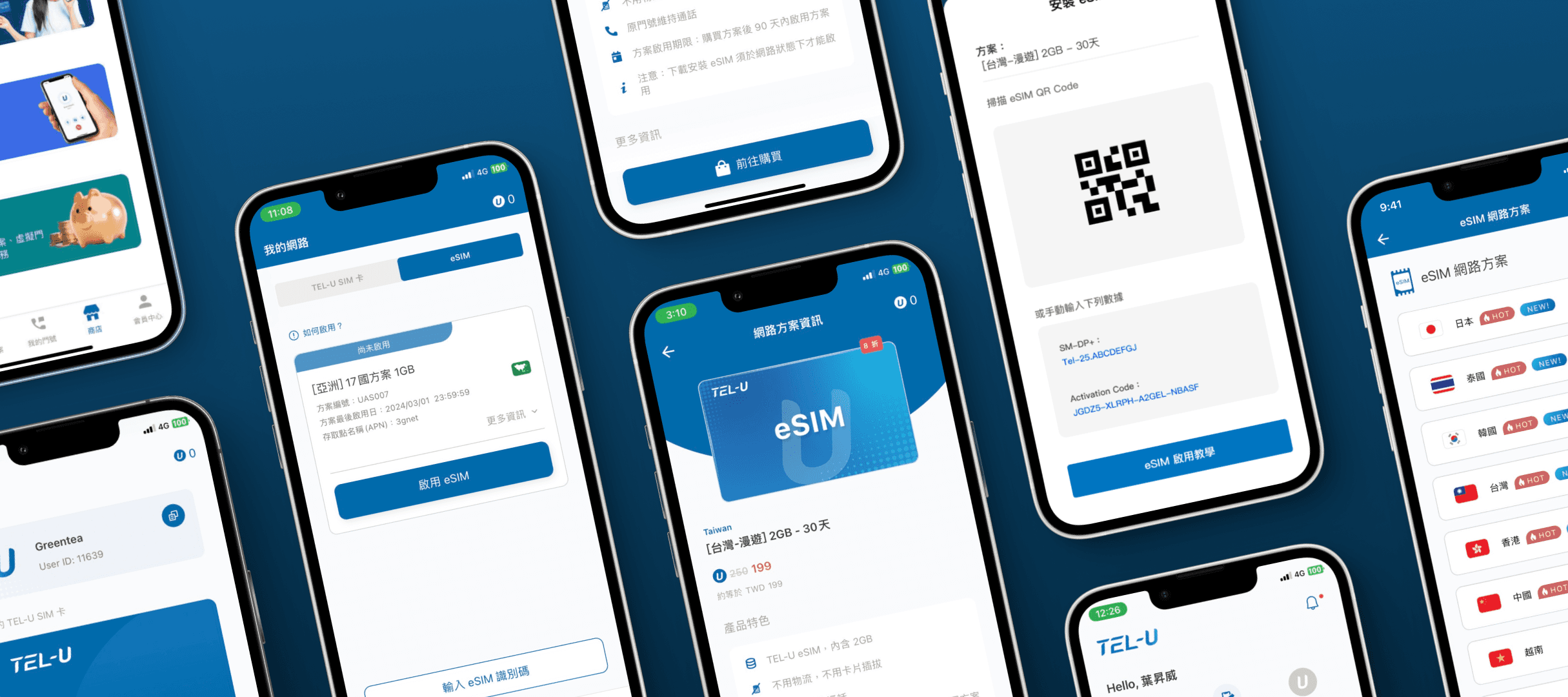
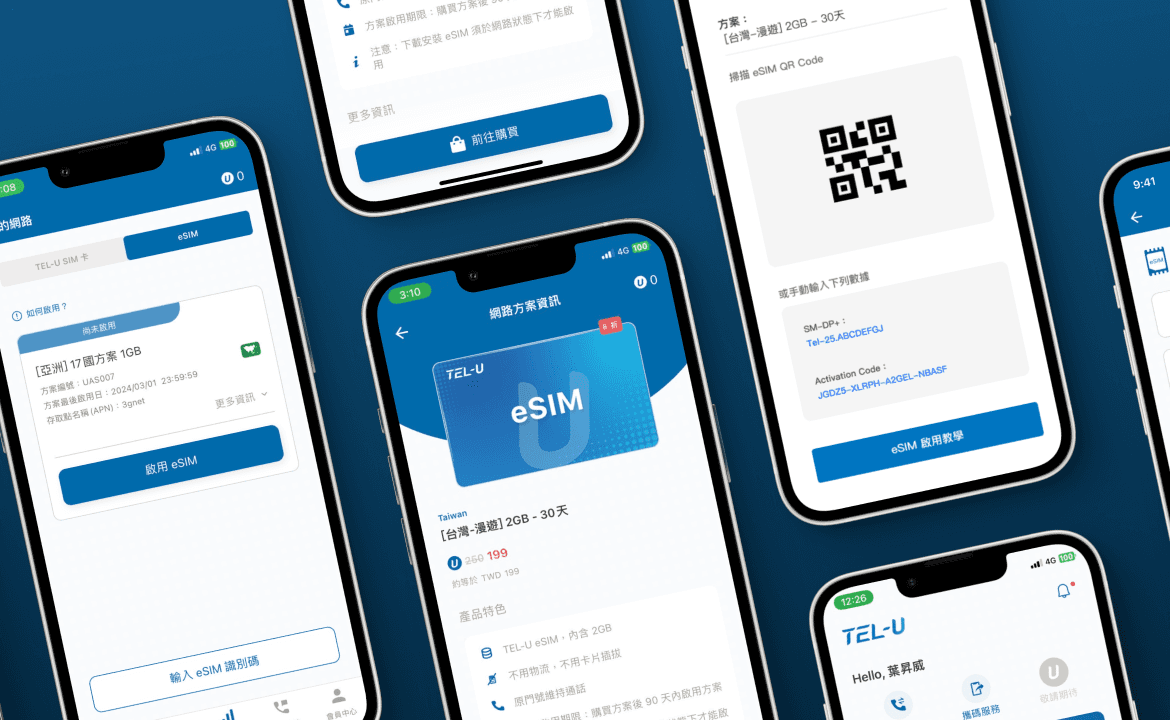
TEL-U eSIM Activation Experience Design

TEL-U eSIM Activation Experience Design

Role

UX Designer

Team

Ul Designer*1, Engineers*4, PM*1, Marketing*1

Responsibilities

User Flow & Interface Design, competitive analysis, usability testing

Project Background

TEL-U serves international travelers by providing mobile plans within a single app. With the shift toward eSIM adoption, the company aimed to enable in-app eSIM activation. This required redesigning the activation flow to support both physical SIM and eSIM during the transition period.

Goals

The goal of this project was to introduce eSIM functionality for international expansion, focusing on fast activation and a frictionless user experience.

Challenges

Redesign the entire eSIM flow under tight deadlines and complex cross-team coordination, while overcoming technical constraints.

Outcome

The new eSIM flow boosted conversion to 50%, revenue by 120%, and overall downloads by 50%.

eSIM Design Process

eSIM Design Process

01 Early Exploration

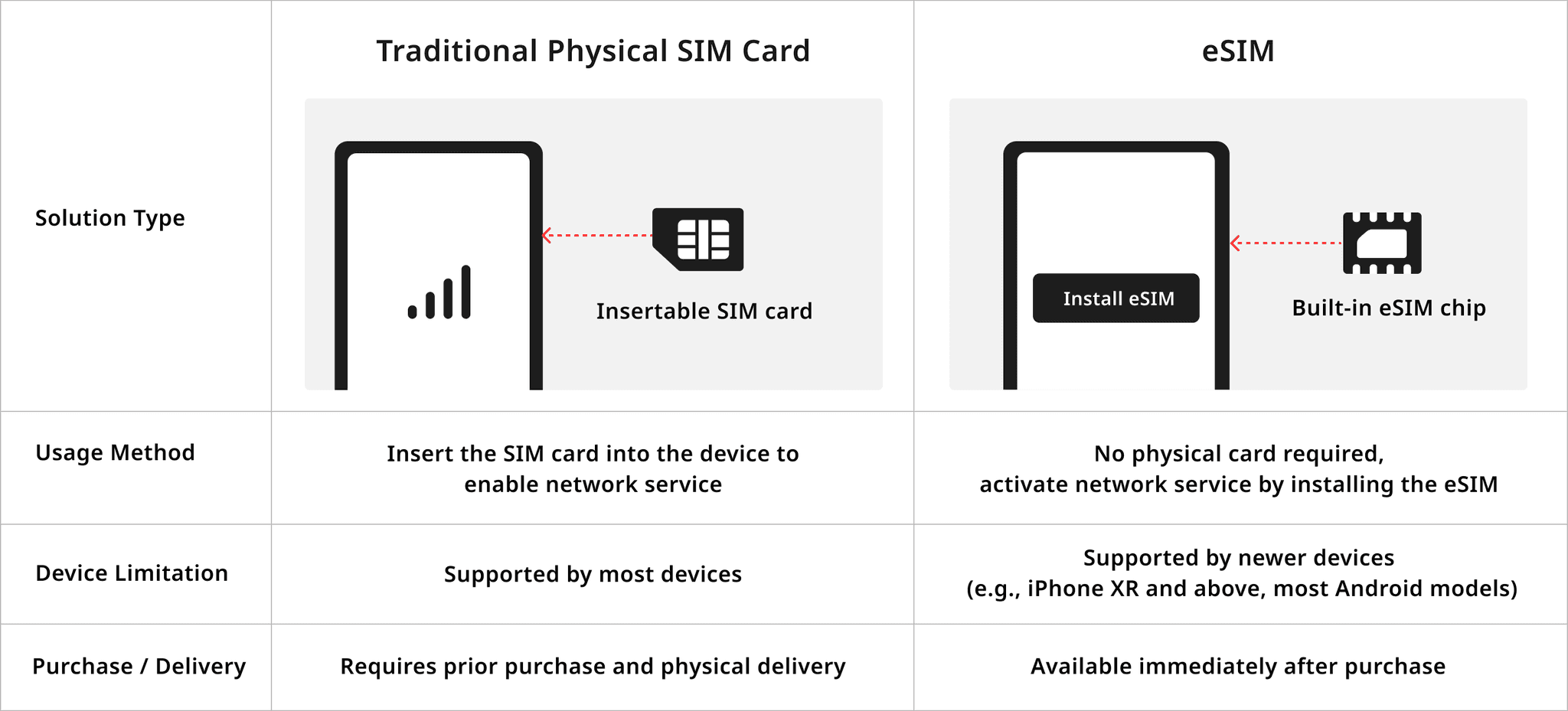
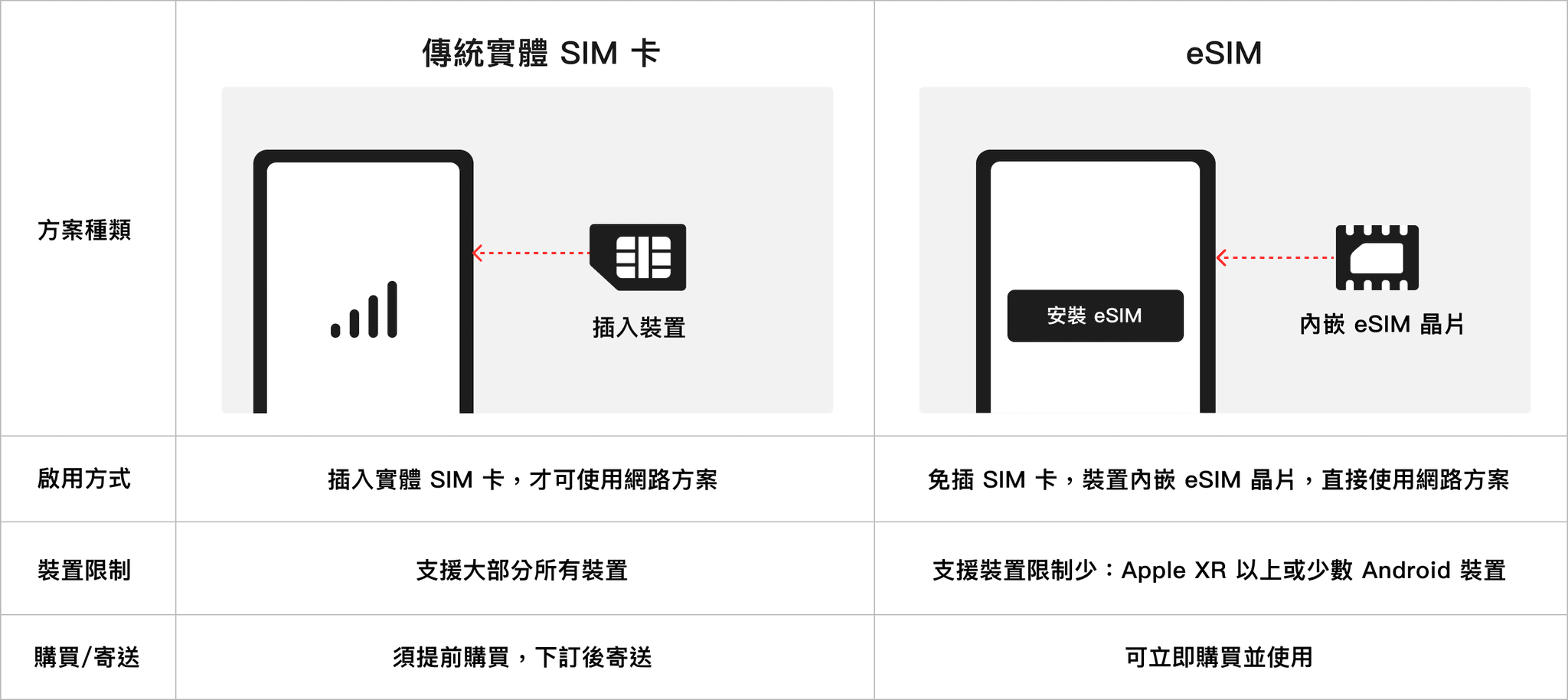
Understanding the difference between physical SIM and eSIM

eSIM is essentially a digital SIM that allows a device to connect to mobile networks without inserting a physical card

Network Usage Behavior

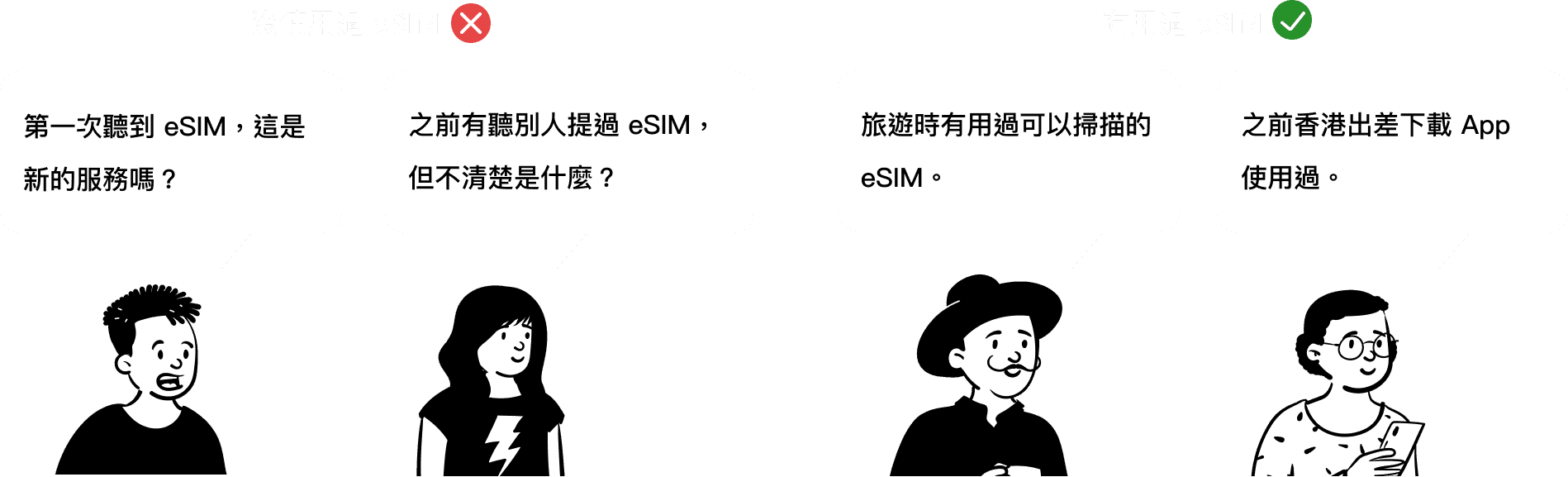
Over 90% of TEL-U users are based in Taiwan and still rely primarily on physical SIM cards when traveling abroad. To understand users’ awareness and experience with eSIM, we conducted informal exploratory interviews with daily commuters, frequent travelers, and general smartphone users.

The findings showed that most participants had limited knowledge of eSIM, and some had never heard of the service before. This indicates that the eSIM market in Taiwan is still in an early stage, presenting opportunities for user education and broader adoption.。

Key insights

Users with overseas travel experience showed significantly higher understanding and acceptance of eSIM. Their primary motivation comes from the need for immediate and convenient mobile access when traveling abroad. This group demonstrates clear usage scenarios and a stronger willingness to convert, making them an ideal target for early stage product education and promotion.

Users with overseas travel experience showed significantly higher understanding and acceptance of eSIM. Their primary motivation comes from the need for immediate and convenient mobile access when traveling abroad. This group demonstrates clear usage scenarios and a stronger willingness to convert, making them an ideal target for early stage product education and promotion.

Product Strategy & Business Goal

Taiwan is currently in a transitional stage where physical SIM and eSIM services coexist.
With the company prioritizing eSIM adoption, the design challenge was to integrate both services within a single interface while maintaining a smooth user transition.
The goal was to increase eSIM adoption while still supporting physical SIM users, ensuring service stability throughout the transition period.

Primary

Increase eSIM Adoption

Strategy

eSIM eliminates the need for physical cards and reduces production and logistics costs, while enabling more flexible pricing and data allocation.

Secondary

Retain Physical SIM

Strategy

Since some devices do not support eSIM, physical SIM service remains available to maintain coverage and user flexibility.

02 Requirement Exploration

Competitive Analysis

To understand how other services handle eSIM installation, I analyzed three eSIM-enabled apps: Mint Mobile, Yesim and AIRSIM.
The comparison focused on installation steps, CTA guidance, information structure and instructional support.
These findings helped define the direction of our activation flow and onboarding guidance.

Design Insights

🟢 Its streamlined flow emphasized the need to shorten the completion path and ensure each step has a clear purpose.

🟠 Although the steps are longer, its instructions are comprehensive and useful for defining our visual guidance.

🔵 Its experience is intuitive, but its business and technical model differ from ours, making it less directly applicable.

Initial Concept Exploration

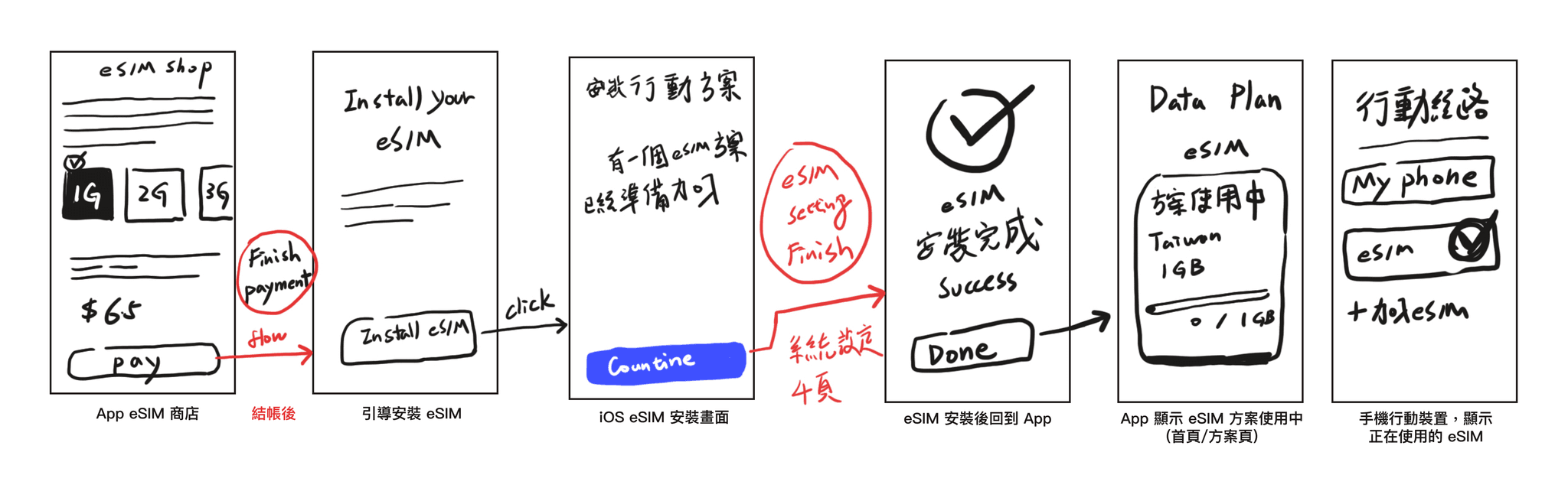
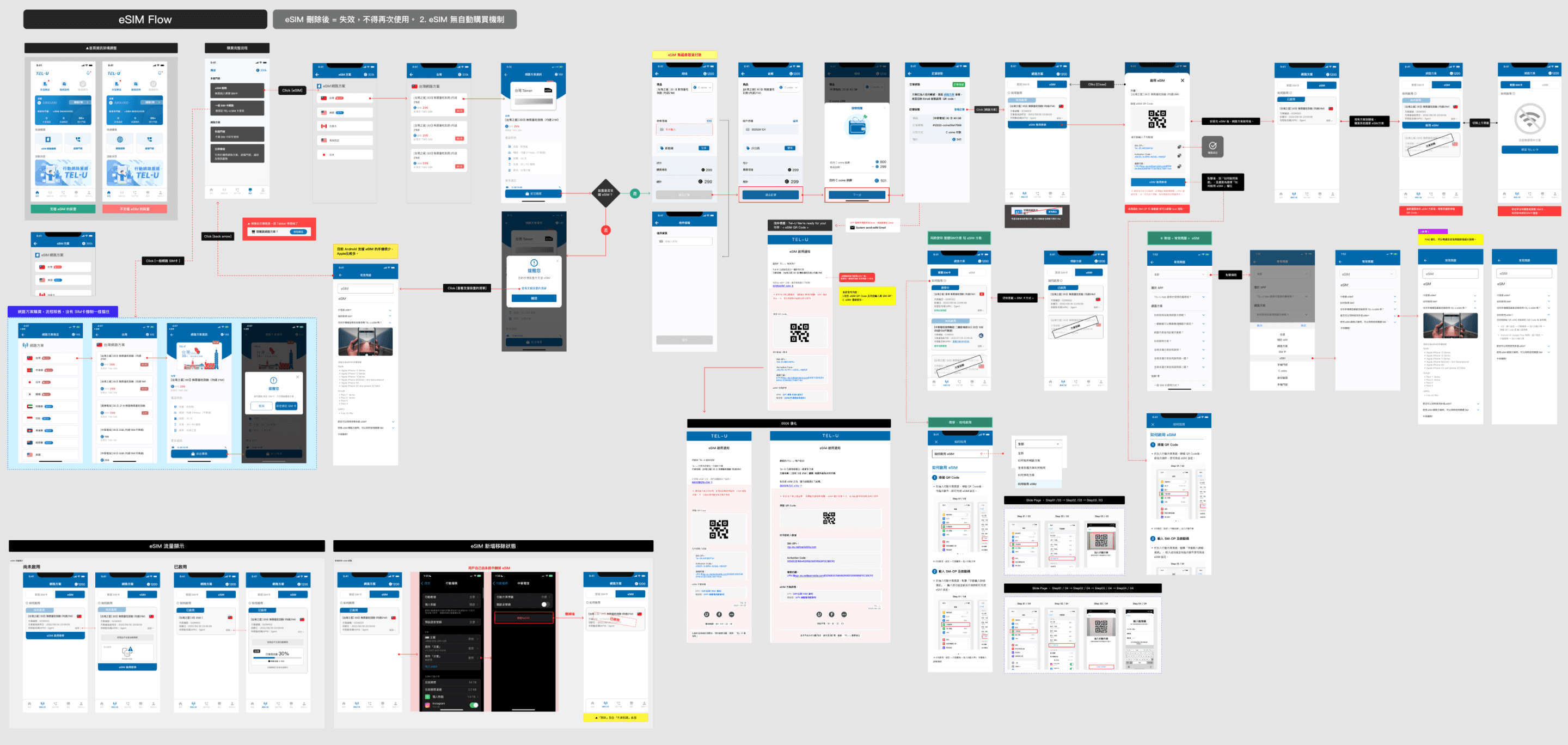
After reviewing multiple eSIM apps, I summarized the complete eSIM activation flow

After reviewing multiple eSIM apps, I summarized the complete eSIM activation flow

After reviewing multiple eSIM apps, I summarized the complete eSIM activation flow

1

Purchase an eSIM plan

2

Install the eSIM service

Install the eSIM service

Install the eSIM service

3

Follow instructions to activate eSIM in system settings

4

Complete activation successfully

Before starting the design, I created a simplified flow diagram to clarify each step’s context and key actions.

However, something unexpected still occurred. 😧

Before starting the design, I created a simplified flow diagram to clarify each step’s context and key actions. However, something unexpected still occurred. 😧

Unexpected Issue: eSIM Technical Adjustment Notice!

Unexpected Issue: eSIM Technical Adjustment Notice!

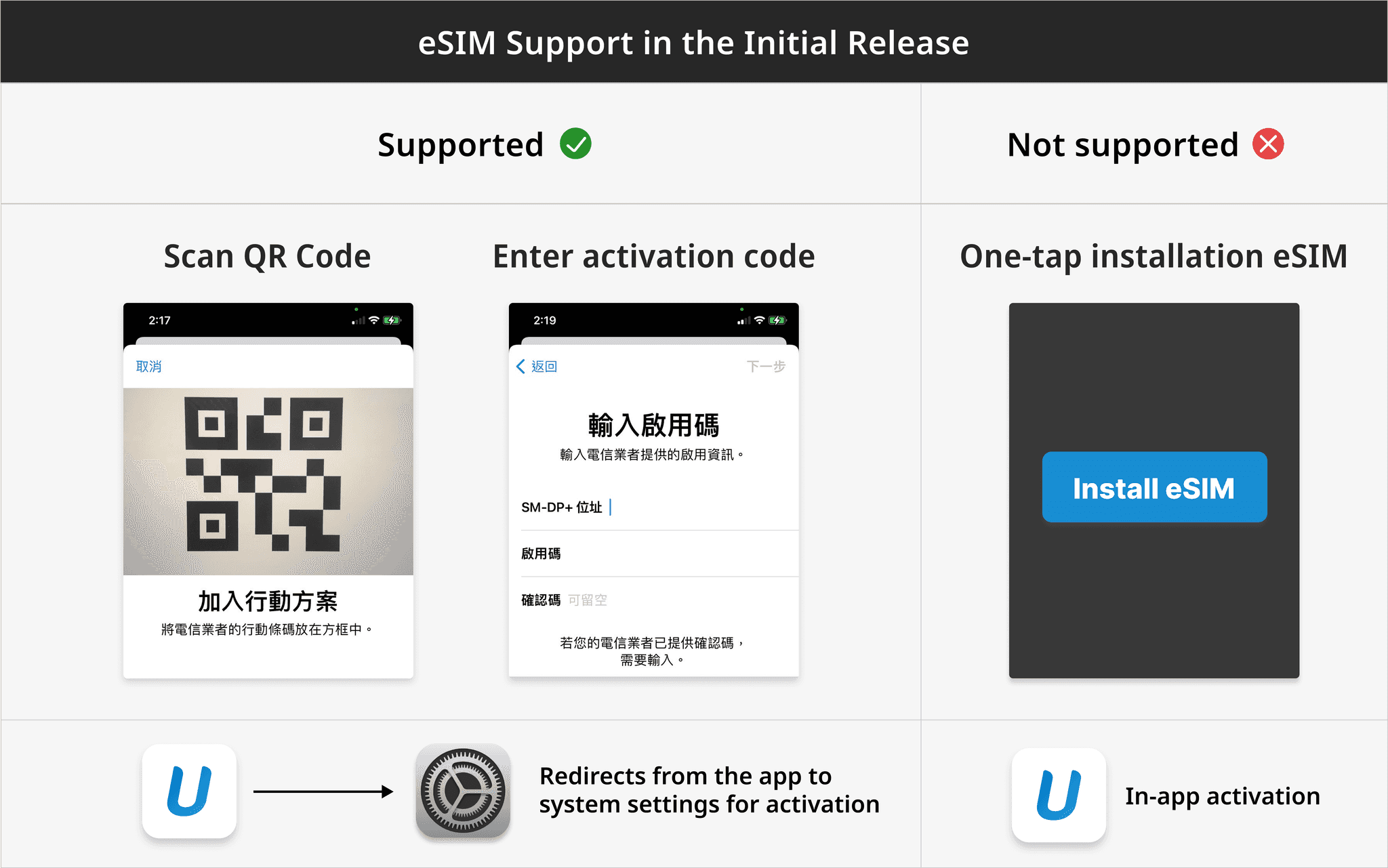
After finalizing the initial flow, I unexpectedly received a technical update.
Due to commercial constraints, the first version of eSIM would only support activation via QR code scanning or entering an activation code.

After finalizing the initial flow, I unexpectedly received a technical update.
Due to commercial constraints, the first version of eSIM would only support activation via QR code scanning or entering an activation code.

After finalizing the initial flow, I unexpectedly received a technical update.
Due to commercial constraints, the first version of eSIM would only support activation via QR code scanning or entering an activation code.

After finalizing the initial flow, I unexpectedly received a technical update.
Due to commercial constraints, the first version of eSIM would only support activation via QR code scanning or entering an activation code.

Identifying the Pain Point

Although users can install an eSIM through QR code scanning or activation codes, both methods require leaving the app to finish the process in system settings, which creates unnecessary friction. Clear guidance and step-by-step instructions are therefore crucial to improving the activation experience.

03 Define Goals

03 Define Goals

After clarifying the full eSIM activation flow and all related requirements, I identified three core problems and mapped the interfaces affected by each. Before moving into the design phase, I also outlined potential solution strategies.

04 Interface Design

04 Interface Design

04 Interface Design

The design walkthrough is presented from the perspective of a first-time user completing the full eSIM activation process. It is divided into four parts:

01 Onboarding

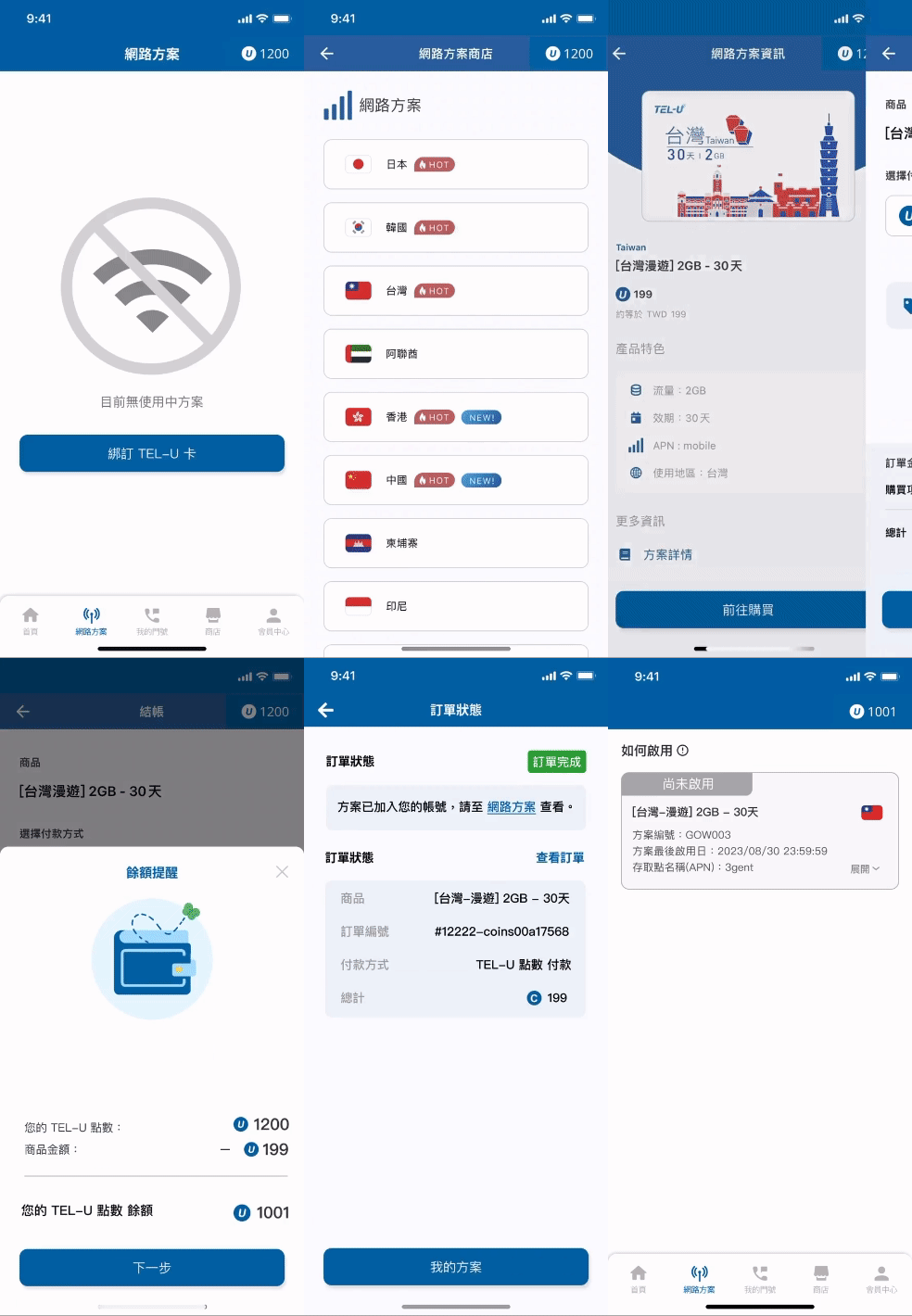
The original onboarding supported only physical SIM cards, with SIM binding as the main action. After adding eSIM, the primary action shifted to “Purchase eSIM,” while physical SIM binding was kept as a secondary option.

Although some users’ devices may not support eSIM, we kept the option visible to clearly communicate the new service and allow users to check the supported device list, including cases where they may own another eSIM-compatible device.

A prompt appears for unsupported devices, guiding users to the supported device list.

A prompt appears for unsupported devices, guiding users to the supported device list.

02 Home Page Optimization

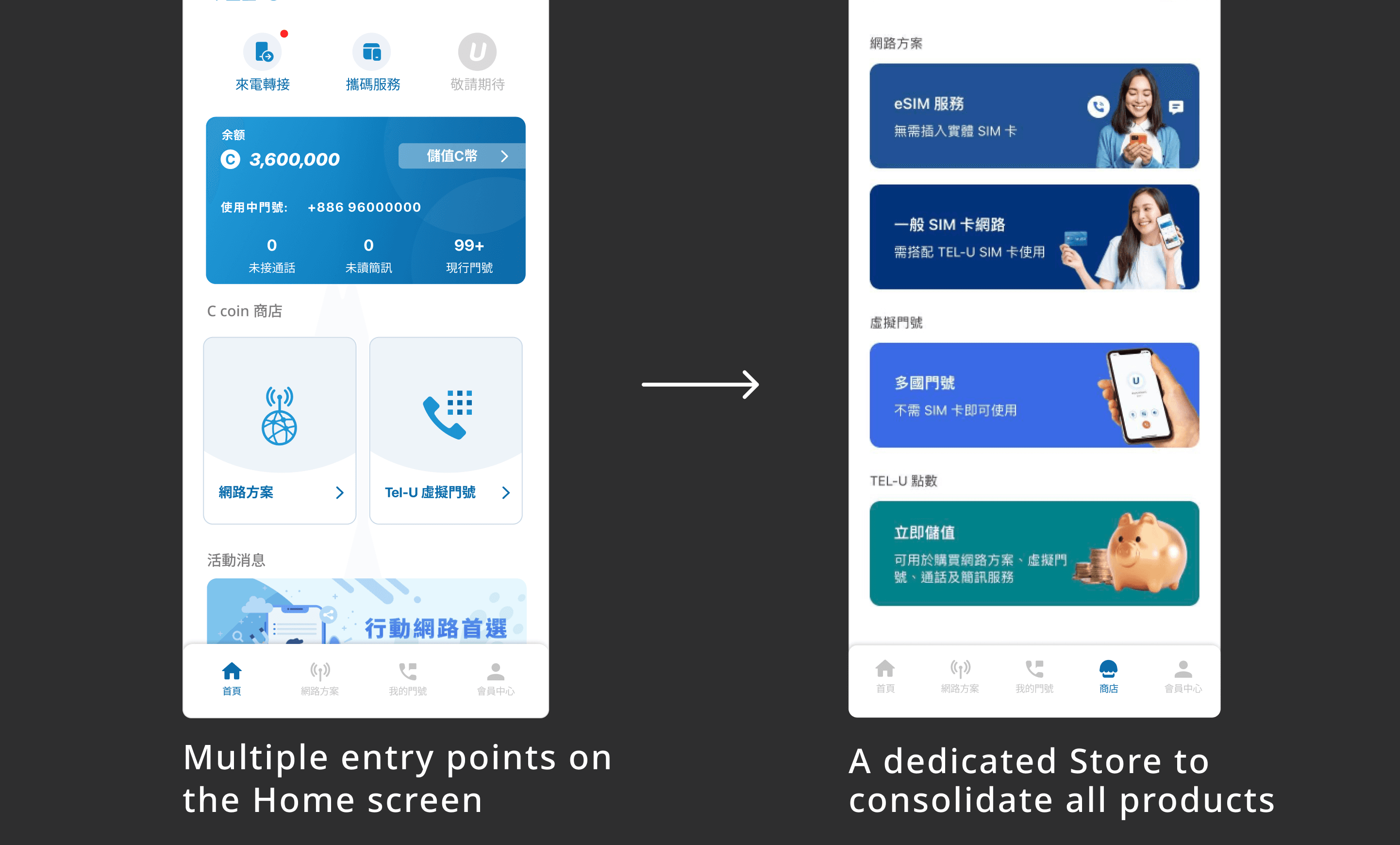
The primary goal of the home screen is to improve purchase conversion. The layout was customized based on device type and segmented by the user’s selected plan category. This update focused on optimizing the purchase area and adding a dedicated Store entry to improve overall navigation and buying efficiency

Optimization 1

Home Purchase Guidance

The home screen auto-adjusts plan options based on device compatibility, showing only physical SIM for unsupported devices to prevent confusion.

Optimization 2

Added Store Entry

Previously, all products were linked directly from the home screen, which became unsustainable as the service lineup expanded. With the introduction of eSIM, a dedicated Store entry was added to reduce homepage clutter and improve product browsing and hierarchy.

03 eSIM / SIM Segmented Purchase Flow

When planning the selection flow for eSIM and physical SIM, I focused on device compatibility and differences in usage scenarios. I aligned early with the engineering team to confirm technical constraints, which helped ensure the flow was feasible and allowed me to focus on key interactions during UI design.

Design Proposal

Interaction Pattern

I proposed three options during planning, and the team selected a tab-switch pattern. It clearly separates physical SIM and eSIM and provides an intuitive interaction. This approach also simplifies device-compatibility checks and leaves room for future flow adjustments.

Extended Concept

Distinguishing eSIM-Supported Devices

Only devices that support eSIM need to display both options, so the tab layout is shown in those cases.
For unsupported devices, users can only choose a physical SIM, so no additional tabs are required and the original layout remains unchanged.

Product Strategy

Purchase Guidance

By default, we wanted to guide users toward the most suitable option.
The plan selection page follows the same logic as the home screen, displaying options based on whether the device supports eSIM.

Supported eSIM Device
Guides users to the eSIM plan.

Unsupported eSIM Devices
Guides users to the physical SIM plan

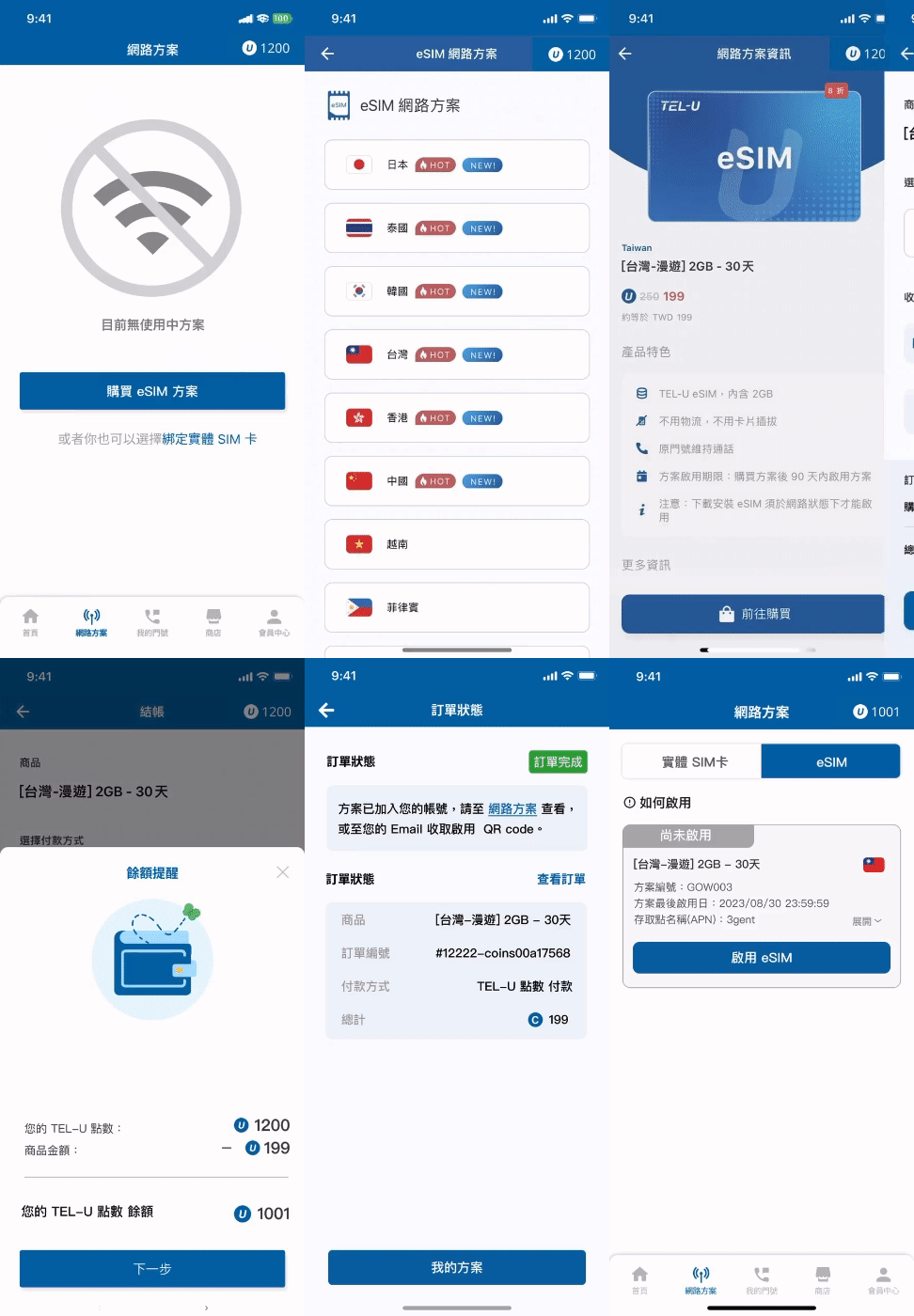
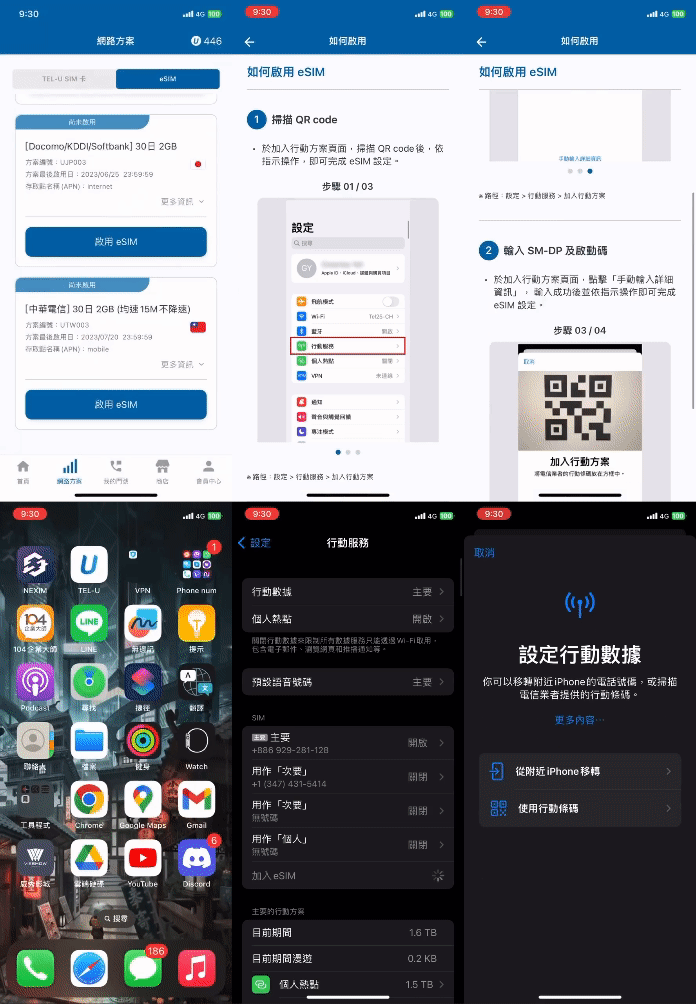
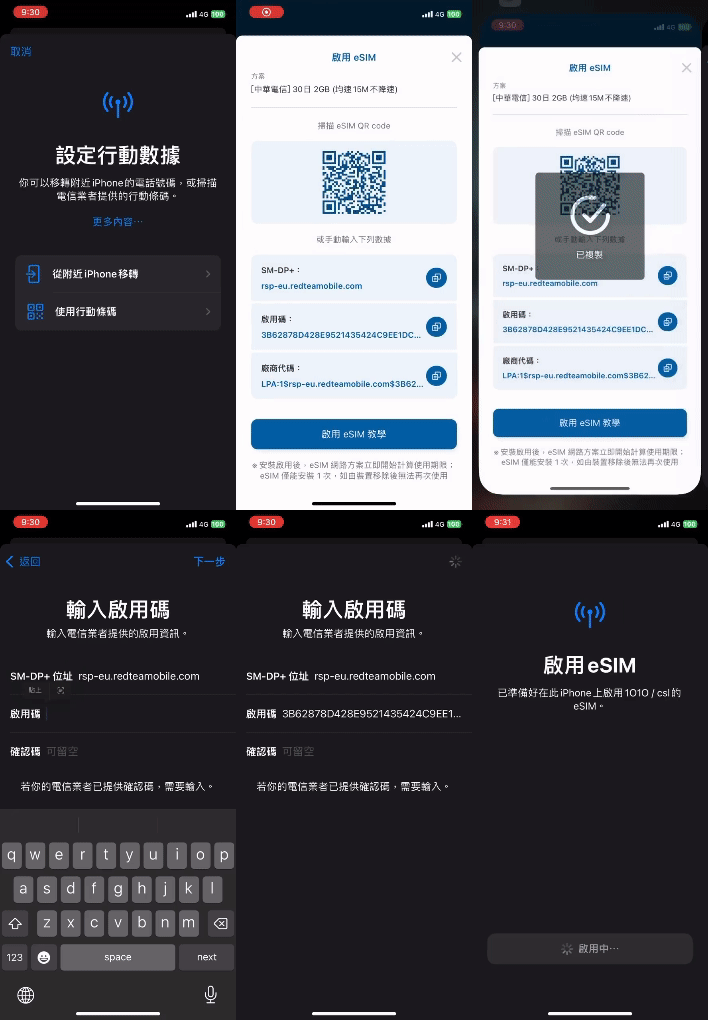
04 eSIM Activation Flow

The activation flow is more complex because users must leave the app and complete the setup in system settings by scanning a QR code or entering an activation code.
The key design focus was providing clear guidance to reduce confusion during this interruption

Usability Testing

To validate the design, I conducted usability tests with colleagues from different teams.
The test scenario used activation-code entry as the core eSIM method, allowing us to observe user behavior through task-based scenarios. This helped identify pain points and learning curves, ensuring the design could support real usage conditions.

Test Flow

Users first review the activation instructions and eSIM tutorial in the installation screen (Part A), then proceed to the device settings to complete activation (Part B).

Task Objective

Verify whether users can complete eSIM activation independently and confirm that the design provides clear guidance throughout the process.

Verify whether users can complete eSIM activation independently and confirm that the design provides clear guidance throughout the process.

Problem Hypothesis

Users are expected to complete Part A, the in-app tutorial, without difficulty.
Part B, the system-level activation outside the app, may take longer due to unfamiliarity.

Expected eSIM Activation Flow for Participants

Test Results

Test Results

The results differed from my expectations. Users did not struggle during the system setup steps; instead, most confusion occurred on the initial eSIM installation instruction page.

Participant Feedback

Participant Feedback

Interface Improvements After Testing

We refined the interface by strengthening the instructional button and adding a copy button to streamline activation.


(The system-level activation flow cannot be modified.)

We refined the interface by strengthening the instructional button and adding a copy button to streamline activation.

(The system-level activation flow cannot be modified.)

View the eSIM tutorial after purchase

View the eSIM tutorial after purchase

Enter activation code in system settings

Enter activation code in system settings

05 Launch and Iteration

eSIM Launch Feedback
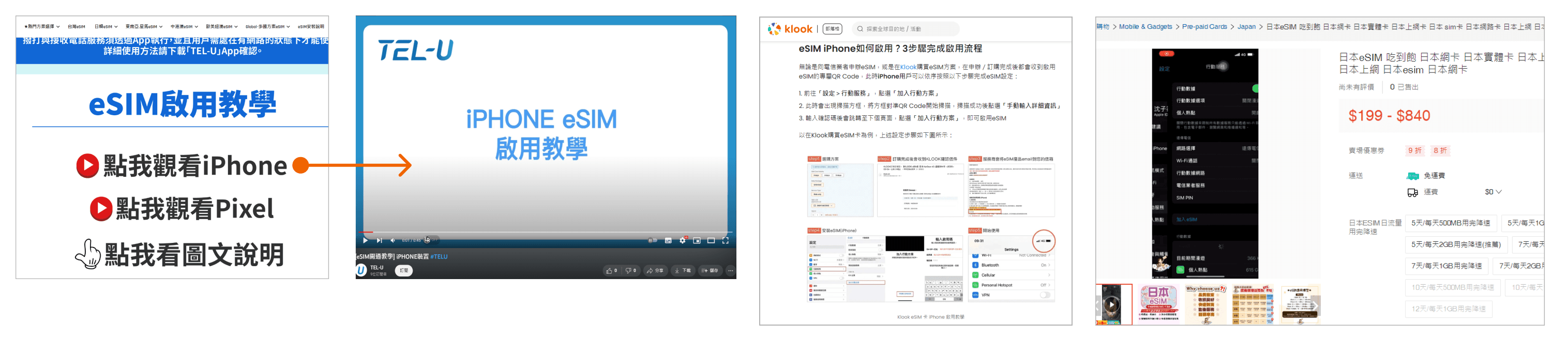
User feedback from marketing and customer support showed no major issues with device-level activation once instructions were clarified. First-time activation averaged about one minute, and most users quickly became familiar after initial use.

Ongoing Product Improvements

Subsequent iterations focused on increasing TEL-U membership. We allowed non-supported devices to purchase eSIM and introduced cross-platform entry points to bring in new users.
The activation flow itself remained unchanged; most updates addressed user issues, such as cases where users deleted or reactivated their eSIM in device settings. A clear “Do not delete” reminder was added to prevent these errors.

eSIM Launch Impact

After launch, eSIM significantly increased TEL-U’s member conversion rate and revenue. eSIM adoption grew rapidly, while physical SIM usage declined, aligning with the intended business goals.

Although the flow using QR code scanning or activation codes works, I still find it relatively complex. Even with detailed instructions provided across platforms, first-time users may still encounter friction.
Looking ahead, I hope the product can support one-tap eSIM activation to further simplify the process and improve overall usability.

Member acquisition

Member acquisition

+ 50%

+ 50%

+ 50%

Revenue growth

Revenue growth

+120%

+ 50%

+ 50%

Migration from physical SIM to eSIM

Migration from physical SIM to eSIM

+ 10%

+ 50%

+ 50%

Increase in app downloads

Increase in app downloads

+ 40%

+ 50%

+ 50%

Project Reflection

The main challenge was integrating eSIM into the existing TEL-U structure. Introducing a new service required rethinking the entire flow and balancing old and new patterns under tight timelines and technical constraints.

I gathered feedback from both eSIM-ready users and those with unsupported devices to ensure the design worked across different scenarios. This reinforced how deeply a designer must understand product architecture when a feature influences core system logic.

Launching this high-complexity feature within two months was highly rewarding. With strong support from engineering and marketing, we delivered a solution that improved product competitiveness and contributed to revenue growth. I look forward to expanding eSIM into more markets.

The main challenge was integrating eSIM into the existing TEL-U structure. Introducing a new service required rethinking the entire flow and balancing old and new patterns under tight timelines and technical constraints.

I gathered feedback from both eSIM-ready users and those with unsupported devices to ensure the design worked across different scenarios. This reinforced how deeply a designer must understand product architecture when a feature influences core system logic.

Launching this high-complexity feature within two months was highly rewarding. With strong support from engineering and marketing, we delivered a solution that improved product competitiveness and contributed to revenue growth. I look forward to expanding eSIM into more markets.

The main challenge was integrating eSIM into the existing TEL-U structure. Introducing a new service required rethinking the entire flow and balancing old and new patterns under tight timelines and technical constraints.

I gathered feedback from both eSIM-ready users and those with unsupported devices to ensure the design worked across different scenarios. This reinforced how deeply a designer must understand product architecture when a feature influences core system logic.

Launching this high-complexity feature within two months was highly rewarding. With strong support from engineering and marketing, we delivered a solution that improved product competitiveness and contributed to revenue growth. I look forward to expanding eSIM into more markets.

Thanks for watching

Thanks for watching

Thanks for watching

Thanks for watching