
Project Name
2025/06 - 2025/12
EV Charging Management Platform Redesign
Role
UI/UX Designer
Team
Frontend Engineer ×1, Backend Engineers ×4, PM ×1
Responsibilities
Interface Flow Design, Design System Rebuild, Product Training Videos
Project Background
CSMS is a backend management platform for EV charging operators, integrating site, charger, and member management. This project focused on restructuring the charger setup workflow and building a consistent design system to support commercialization and future product development.

Goals & Challenges
The main challenge was restructuring a fragmented IoT device setup workflow and clarifying how chargers, on-premise systems, and the cloud platform interact and provide status feedback. At the same time, I needed to standardize components and product guidelines without disrupting the existing development pace.
Results & Impact
Redesigned the charger setup workflow and status presentation to reduce the complexity of cross-platform operations. In parallel, I established a Design Guideline and gradually consolidated UI components to improve consistency between design and development. The product is now deployed in client environments, and commercial partnerships are underway.
Business Goals
As CSMS entered commercialization, the primary goal was to support the sales team in bringing the product to market. On the design side, I focused on improving component consistency, interaction patterns, and operational logic to support future development.

Design Process
The team worked in two-week sprints but initially lacked a clear design collaboration process. I reorganized requirement discovery, design proposals, and development handoff to clarify each stage and delivery point.

Main Task
CSMS is designed to help administrators manage charging sites and chargers more efficiently. At the time, Site Setup and Member Management were already in place, but Charger Management still lacked a complete workflow. This phase focused on restructuring how chargers were set up and managed.
01
Understanding the Current Workflow

Why Redesign the Setup Workflow?
The original setup process was split between EVUI and CSMS, requiring engineers to switch systems, manually enter device IDs, and copy the Server URL. Moving setup into CSMS centralized the process. The system generates the device ID and provides the Server URL, reducing repeated input, system switching, and setup errors.
The setup process shifted from EVUI to CSMS, centralizing charger configuration in the cloud platform.
Before
EVUI-Led Setup

Aftre
CSMS-Led Setup

Identifying Workflow & Interface Issues
Reviewing the existing interface revealed several usability and consistency issues that also needed to be addressed in the redesign.
Radio Buttons were used for connector filtering, which was inconsistent with similar interfaces.
The Charger ID was labeled only with “#”, making its meaning unclear.
Only two connectors were shown by default, even though the actual number varies by charger.
Onboard Status lacked enough visual distinction for users to identify each state quickly.

02
Design Proposal
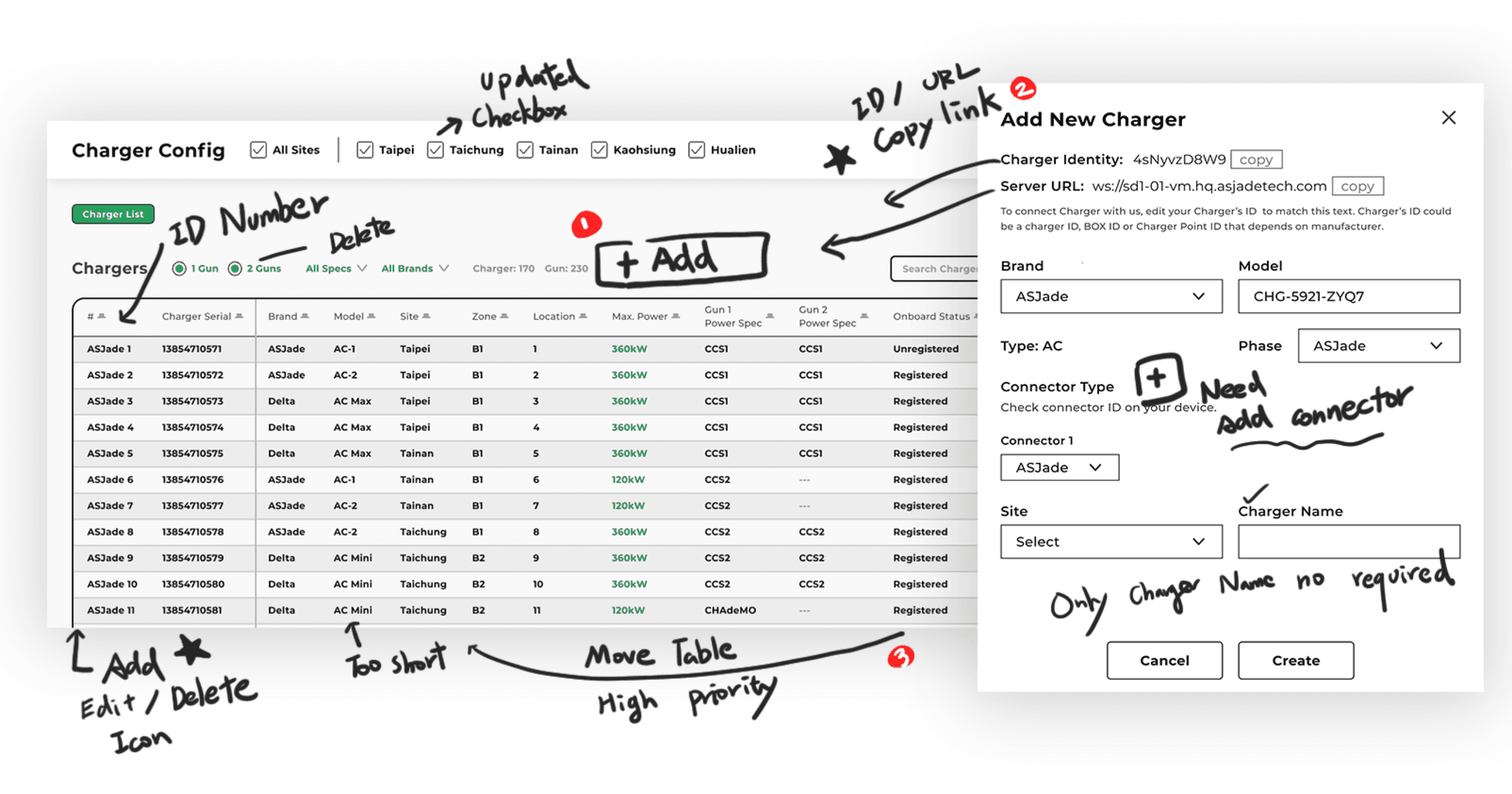
After the PM provided initial ideas and sketches, I refined the feature structure and UI logic, filling in details around adding chargers, table fields, and status definitions. I also applied my experience designing B2B tools and workflows to make charger states easier to identify and track.
1
New Features & Table Updates
Added Add Charger, allowing CPOs to create and manage chargers in CSMS.
Added copy actions for Charger ID and Server URL to support device setup.
Reordered table columns to bring charger status forward and improve visibility.
2
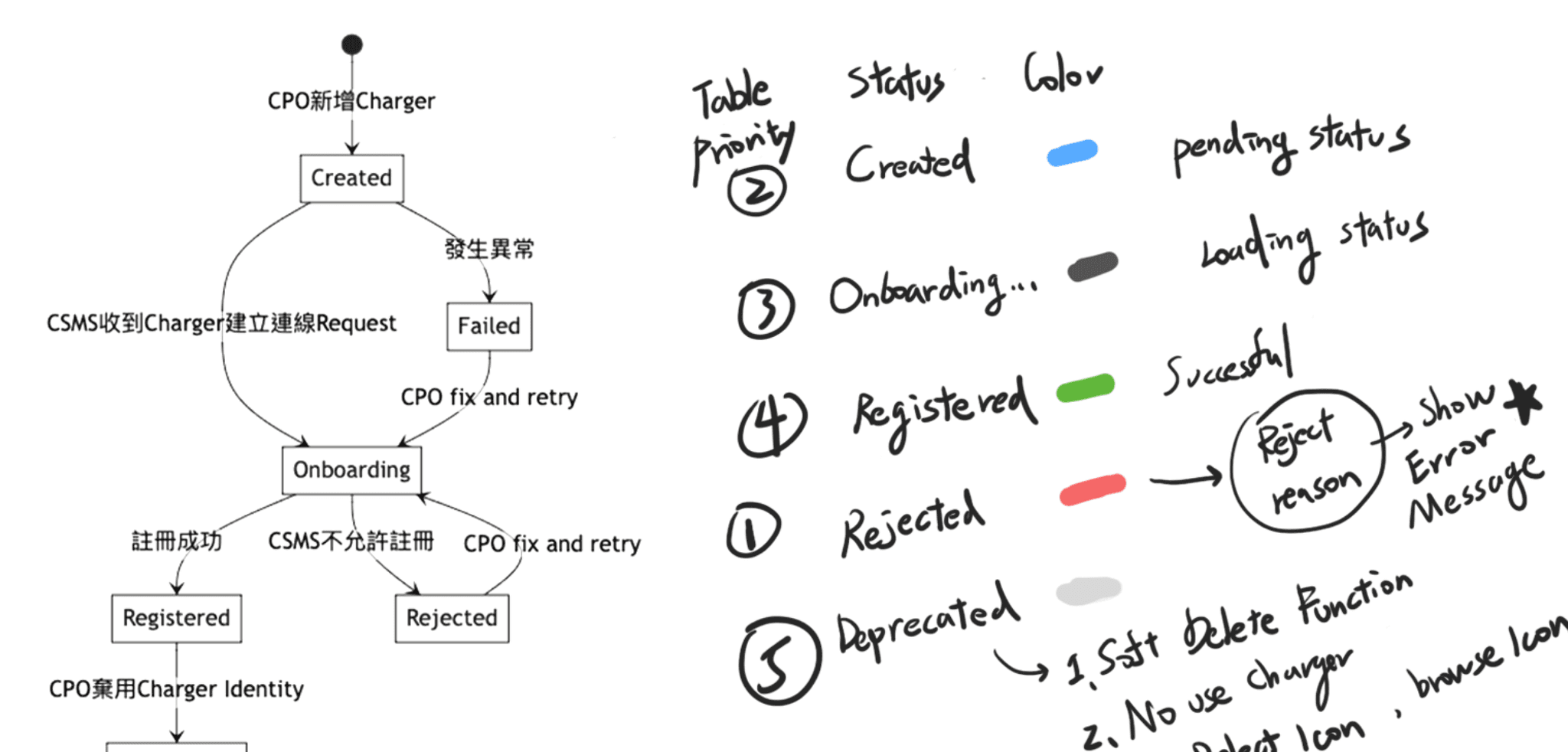
Charger Status Design
The initial proposal used colors to distinguish charger states and sorted the list by priority, helping users notice abnormal or pending chargers first.
Hardware Limitation
Due to firmware constraints, detailed error information was unavailable. As a result, only Failed and Rejected statuses could be displayed.
3
Improving Usability
The existing table did not make available actions obvious. I added Edit, Delete, and View actions to the left side and standardized their placement and styling across tables.

03
Design Output
Charger List Design

Reordered table columns by information priority, bringing key statuses and common actions forward.
Moved Edit, Delete, and View actions to the left for easier access.
Redefined charger setup statuses and visual cues to make installation progress easier to track.
Added Charger ID and Server URL copy actions to support device setup.
2.Charger Setup Workflow
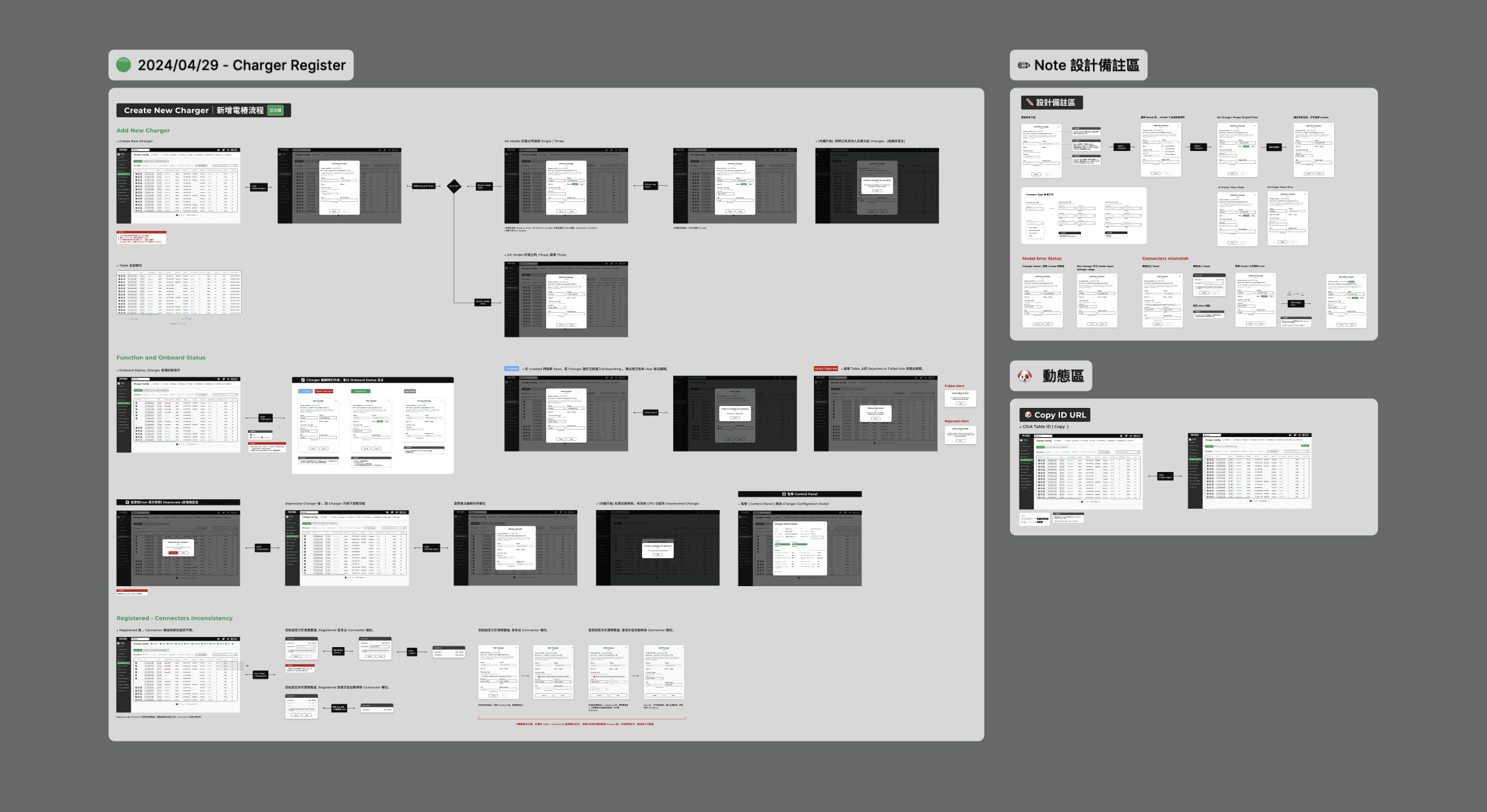
Add New Charger
Implemented the earlier Add New Charger proposal in the charger list, allowing CPOs to create and configure chargers directly.


Charger Status Design
Defined charger statuses and setup details based on actual installation stages, using color to distinguish each stage and help administrators track device registration progress.

Before & After
After reorganizing the information hierarchy, table columns, and actions, charger status, filtering, and management became clearer and easier to use.


Post-Launch Internal Feedback
After Charger Setting launched, I interviewed 5 internal team members and collected the following feedback.
Positive Feedback
Issues Identified
Newly created chargers did not appear at the top of the list and required filtering to find.
The URL copy action appeared in every row, and some users suggested moving it to a global action.
Final Decision
The main adjustment was list sorting. The original design prioritized status to highlight abnormal chargers, but users cared more about newly created devices. I changed the list to sort by creation time so new chargers appear first. I kept the ID and URL copy actions in each row because they are often used together and are frequently needed during setup.
Product Training Videos
In addition to the interface and workflow design, I created both Chinese and English product training videos to help customers get started and help new or less familiar team members understand the platform.

Second Task
After taking over the project, I found that the product lacked consistent UI standards. Typography, buttons, input fields, and status colors used different styles, while component naming and design files were also inconsistent, making design and development harder to maintain.

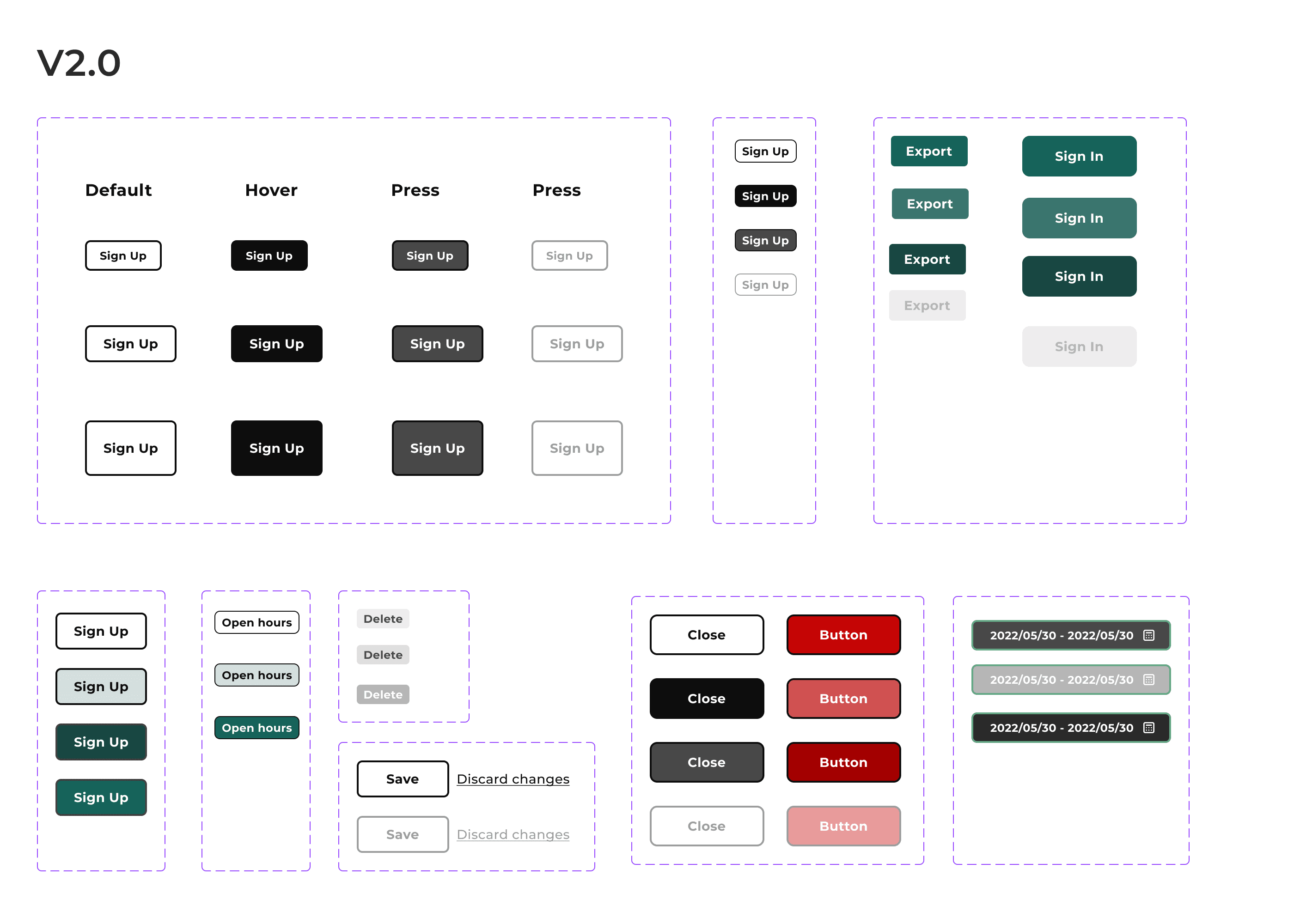
Incremental Component Improvements
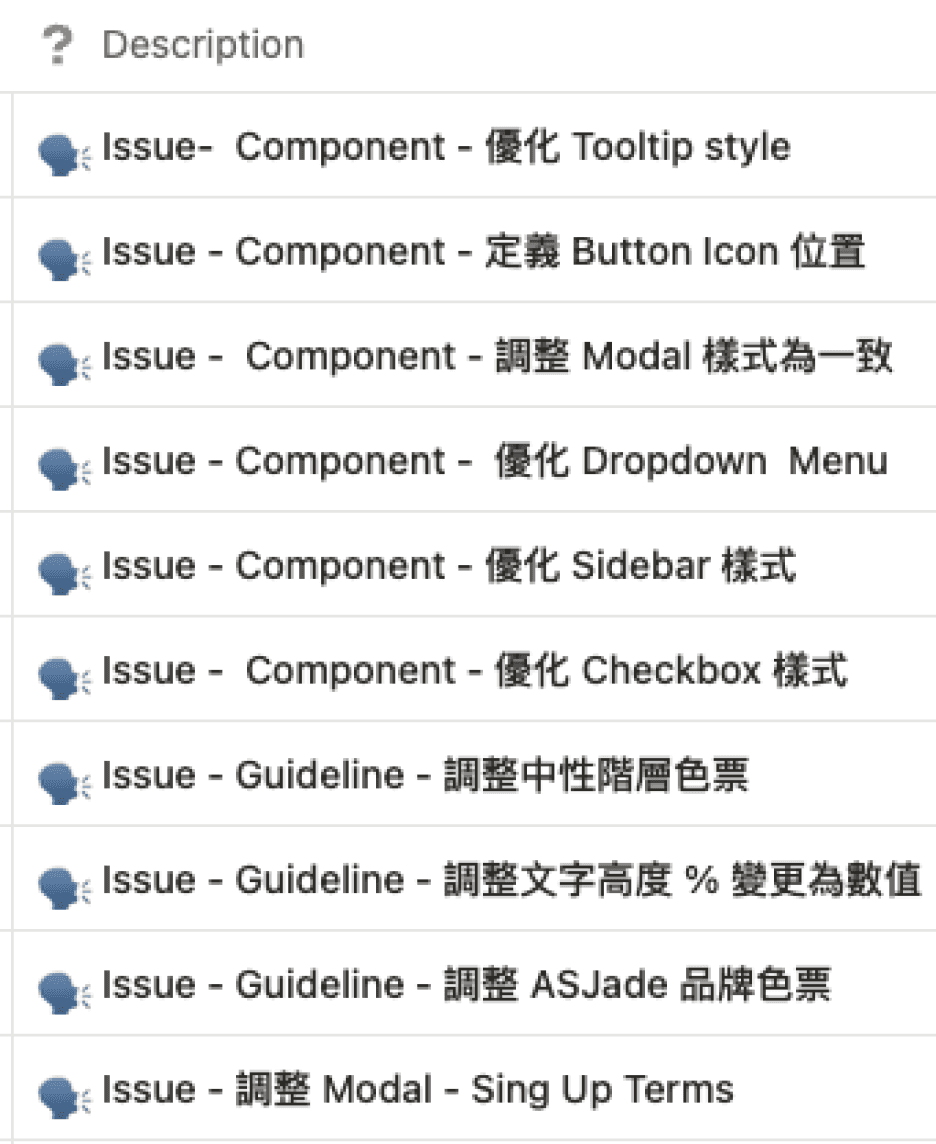
Because the product was still under active development, replacing all components at once could disrupt existing screens and development schedules. Instead, I gradually updated UI components across each sprint, aligning styles and interaction patterns without affecting existing features.



Overall UI Refinement
After about two months of incremental improvements, I realized that fixing individual components was not enough to solve the overall interface issues. I reviewed typography, component standards, and visual consistency, then redefined the UI direction around usability and readability. The goal was to build a design system that could be adopted in the current product and support future feature development.

Rebuilding the Design Guideline
In addition to refining component styles and states, I documented usage rules, scenarios, and detailed specifications to reduce inconsistencies across different pages. I also created documentation in Notion covering component naming and usage, giving design and development a shared reference for future maintenance.


Overall Results
Simplified Charger Setup
Improved the IoT setup workflow and redesigned Charger ID and Server URL configuration to make setup more efficient.
Established Consistent UI Standards
Introduced a Design Guideline and refined UI components to improve alignment between design and development.
Supported Commercialization
The product has been deployed in client environments, with commercial partnerships underway.
Reduced the Learning Curve
Created product training videos to help customers and internal teams understand the platform more quickly.
he product is now deployed in client environments, with the team continuing to improve it based on internal feedback and actual usage. Due to confidentiality, related data and client information cannot be disclosed.
Project Reflection
This was my second IoT hardware project. Working on an in-house product gave me a deeper understanding of chargers, OCPP, and how devices interact with the management platform. It also showed me that these workflows must reflect both device logic and real installation processes, not just interface design.
The main challenge in building the design system was balancing consistency with flexibility. Existing features could not all be redesigned at once, while new requirements kept emerging, so I improved the system gradually alongside development. Research and validation were the biggest areas for improvement. I collected feedback from internal team members, but validation started late and was limited by the development pace. Starting earlier would have given my design decisions a stronger foundation.
Working with an experienced software and hardware team also strengthened my technical understanding. Beyond interface design, I helped clarify how design proposals and development handoffs were discussed and delivered.


